Prerequisite:
1. Eclipse IDE ver. 3.5
2. Googe App Engine Java SDK 1.2.5 and Google Plugin for Eclipse
2. Latest Release of Struts2 framework (note: used the the struts-2.1.8-lib.zip release)
Procedure:
1. Create a new Web Application Project in Eclipse.
1.1. Go to File-New-Web Application Project
1.2. Enter the Project name and Package. Uncheck the "Use Google Web Toolkit".
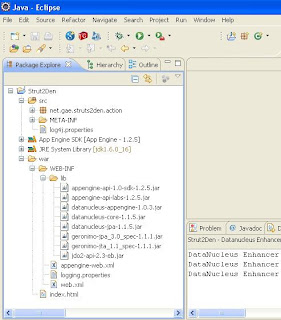
2. Add the following Struts2 libraries to /WEB-INF/lib/. Also, add these libraries to Java Build path (Right click "Project Name"->"Build Path"->"Configure Build Path...". Go to "Libraries" tab and click "Add JARS.. button to add the needed libraries).
commons-fileupload-1.2.1
commons-io-1.3.2
commons-logging-1.0.4
freemarker-2.3.15
ognl-2.7.3
struts2-core-2.1.8
xwork-core-2.1.6
3. Modify the auto-generated appengine-web.xml (to enable the sessions and ssl).
<appengine-web-app xmlns="http://appengine.google.com/ns/1.0">
<application></application>
<version>1</version>

<!-- Configure java.util.logging -->
<system-properties>
<property name="java.util.logging.config.file" value="WEB-INF/logging.properties">
</property></system-properties>

<sessions-enabled>true</sessions-enabled>
<ssl-enabled>true</ssl-enabled>

</appengine-web-app>
4. Modify the
web.xml.
<web-app xsi="http://www.w3.org/2001/XMLSchema-instance"
xmlns="http://java.sun.com/xml/ns/javaee"
web="http://java.sun.com/xml/ns/javaee/web-app_2_5.xsd"
schemalocation="http://java.sun.com/xml/ns/javaee
http://java.sun.com/xml/ns/javaee/web-app_2_5.xsd" version="2.5">
<filter>
<filter-name>struts2</filter-name>
<filter-class>org.apache.struts2.dispatcher.FilterDispatcher</filter-class>
<init-param>
<param-name>actionPackages</param-name>
<param-value>net.gae.struts2den.action</param-value>
</init-param>
</filter>

<filter-mapping>
<filter-name>struts2</filter-name>
<url-pattern>/*</url-pattern>
</filter-mapping>

<listener>
<listener-class>net.gae.struts2den.common.InitListener</listener-class>
</listener>

<welcome-file-list>
<welcome-file>index.html</welcome-file>
</welcome-file-list>

</web-app>
5. Set the
OgnlRuntime Security Manager.
Note that if you run the application after doing procedure 4, you will get OgnlException. To resolve this , implement an ServletContextListener which will set OGNL security manager to null when the context is initialized.
package net.gae.struts2den.common;

import javax.servlet.ServletContextEvent;
import javax.servlet.ServletContextListener;
import javax.servlet.http.HttpSessionAttributeListener;
import javax.servlet.http.HttpSessionBindingEvent;
import javax.servlet.http.HttpSessionEvent;
import javax.servlet.http.HttpSessionListener;

import ognl.OgnlRuntime;

public class InitListener implements ServletContextListener,
HttpSessionListener, HttpSessionAttributeListener {

public void contextInitialized(ServletContextEvent sce) {
OgnlRuntime.setSecurityManager(null);
}

@Override
public void contextDestroyed(ServletContextEvent arg0) {
// TODO Auto-generated method stub

}

@Override
public void sessionCreated(HttpSessionEvent arg0) {
// TODO Auto-generated method stub

}

@Override
public void sessionDestroyed(HttpSessionEvent arg0) {
// TODO Auto-generated method stub

}

@Override
public void attributeAdded(HttpSessionBindingEvent arg0) {
// TODO Auto-generated method stub

}

@Override
public void attributeRemoved(HttpSessionBindingEvent arg0) {
// TODO Auto-generated method stub

}

@Override
public void attributeReplaced(HttpSessionBindingEvent arg0) {
// TODO Auto-generated method stub

}

}
Note: in web.xml (of procedure 4 ), an entry for InitListener is already implemented as
<listener>
<listener-class>net.gae.struts2den.common.InitListener</listener-class>
</listener>
6. Create
struts.xml in src folder
<struts>

<constant name="struts.ui.theme" value="simple">

<package name="helloworld" namespace="/helloworld" extends="struts-default">
<global-results>
 <result name="failed">/WEB-INF/jsp/myapp1/failed.jsp
 </result>
</global-results>

<!--  http://localhost:8080/helloworld/HelloWorld.action -->
<action name="HelloWorld" class="net.gae.struts2den.action.HelloWorld">
 <result>/WEB-INF/jsp/helloworld.jsp</result>
</action>
</package>

</constant></struts>
7. Create the
HelloWorld action (net/gae/struts2den/action/HelloWorld.java)
package net.gae.struts2den.action;
import com.opensymphony.xwork2.ActionSupport;

@SuppressWarnings("serial")
public class HelloWorld extends ActionSupport {

public static final String MESSAGE = "Struts is up and running ...";

public String execute() throws Exception {
setMessage(MESSAGE);
return SUCCESS;
}

private String message;

public void setMessage(String message){
this.message = message;
}

public String getMessage() {
return message;
}
}
8. Create the
helloworld.jsp (WEB-INF/jsp/helloworld.jsp)
<h2><s:property value="message"></s:property></h2>
9.
Run the application and open
http://localhost:8080/helloworld/HelloWorld.action and see what happens!
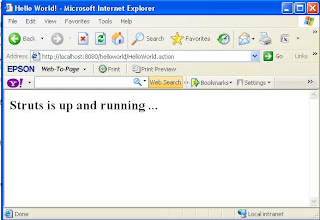
sample application at:
http://www.struts2den.appspot.com/


